
Description
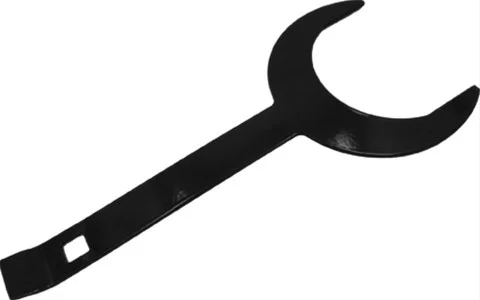
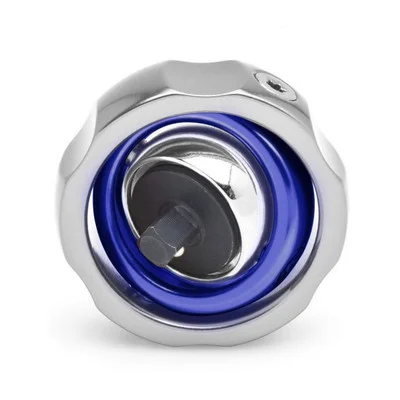
The Phoenix USA Wrench and Bag Installation and Removal Tool (PH1763TOLK) is an essential accessory for maintaining specific Phoenix USA wheel simulators. This thoughtfully designed tool simplifies the processes of installing and removing hub covers, ensuring a secure fit and preventing potential damage. Featuring a dual-ended design, the PH1763TOLK caters to different hub cover attachment styles, making it a versatile addition to your maintenance toolkit. It includes a convenient bag for organized storage and protection, ensuring the tool is readily available when needed.
KEY FEATURES AND BENEFITS:
- This tool offers two primary functions to assist with wheel simulator maintenance. One end is equipped with a precise 73mm hex wrench, specifically engineered to engage with the center attachment bolts found on Phoenix USA hub cover models PH1763L and PH1763R. This ensures proper tightening during installation and allows for easy loosening during removal.
- The opposite end of the tool is shaped to aid in the careful prying off of “baby moon” style pop-in front hub covers. This design minimizes the risk of scratching or denting the delicate surfaces of these covers during removal.
- The inclusion of a storage bag further enhances the tool’s utility by providing a dedicated space for safekeeping, preventing loss and protecting the tool from environmental elements.
- Constructed from robust materials, this tool is built to withstand the demands of regular use, offering reliability and longevity.
SPECIFICATIONS:
- Brand: Phoenix USA
- Manufacturer Part Number: PH1763TOLK
- Part Type: Wheel and Tire Simulator Tools
- Product Line: Phoenix Simulator Installation and Removal Tools
- Wrench Size: 73mm Hex
- Compatibility:
- Phoenix USA Hub Covers: PH1763L, PH1763R (center bolt attachment)
- Phoenix USA Wheel Simulators: Q1009, Q1009L, Q1010, Q1020, Q1020L, Q2010, Q2010L, Q2020, Q2020L, Q2010XL, Q2020XL
- Included: Storage Bag
- Quantity: Sold individually
HOW TO USE:
- For Hub Covers with Center Bolt Attachment (e.g., PH1763L, PH1763R):
- Installation: Align the 73mm hex wrench end of the PH1763TOLK tool with the center attachment bolt of the hub cover. Turn the wrench clockwise to tighten the bolt, securing the hub cover in place. Ensure the bolt is adequately tightened according to the manufacturer’s recommendations.
- Removal: Align the 73mm hex wrench end with the center attachment bolt. Turn the wrench counter-clockwise to loosen and remove the bolt. Carefully detach the hub cover from the wheel.
- For “Baby Moon” Style Pop-In Front Hub Covers:
- Locate the edge of the “baby moon” hub cover where it meets the wheel.
- Carefully position the prying end of the PH1763TOLK tool behind the edge of the hub cover.
- Gently apply leverage to pry the hub cover away from the wheel. Work your way around the circumference of the cover, applying small amounts of pressure until the cover is completely detached.
BENEFITS OF USING THE PHOENIX USA WRENCH AND BAG INSTALLATION AND REMOVAL TOOL (PH1763TOLK):
- Utilizing the specifically designed Phoenix USA Wrench and Bag Installation and Removal Tool (PH1763TOLK) offers several advantages. It ensures the correct fit and torque when installing or removing center bolt style hub covers, minimizing the risk of overtightening or undertightening, which can lead to damage or insecure fittings.
- The integrated 73mm hex wrench is precisely sized for Phoenix USA models PH1763L and PH1763R, providing optimal grip and reducing the chance of slippage or damage to the bolt head.
- The dedicated prying end for “baby moon” style covers offers a safer and more effective method of removal compared to using generic tools, which can scratch or dent the finish of the hub covers.
- Furthermore, the included storage bag provides a convenient and protective solution for keeping the tool organized and readily accessible, contributing to overall efficiency and preventing loss.
- By using the correct tool for the job, you can maintain the appearance and integrity of your Phoenix USA wheel simulators, ensuring their longevity and performance.
FEATURES:
- 73mm Hex Wrench: Precisely engineered for center bolt attachment on specific Phoenix USA hub cover models.
- Dedicated Prying End: Shaped to safely and effectively remove “baby moon” style pop-in front hub covers.
- Included Storage Bag: Provides a convenient and protective storage solution for the tool.
- Robust Construction: Made from sturdy materials to ensure long-lasting performance and reliability.
- Ergonomic Design: Offers a comfortable grip and leverage for efficient operation.
- Direct Compatibility: Specifically designed for use with a range of Phoenix USA hub covers and wheel simulator models.
- Prevents Damage: Helps avoid scratches, dents, or other damage to hub covers during installation and removal.
- Ensures Proper Fitment: Facilitates correct tightening of center bolts for secure hub cover installation.
- Easy to Use: Straightforward design makes the installation and removal process simple and efficient.
- Organized Storage: The included bag helps keep the tool readily available and protected.
Reviews
There are no reviews yet.