
Description
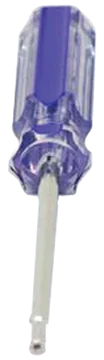
The Phoenix USA QC1019/QC1025AF/QC1030AR Installation Tool (PQC225TOL) is a vital component for the correct fitting and removal of specific Phoenix USA Quick Cover wheel simulator kits. This tool is specifically engineered to work with the Torx security screws utilized in the QC1019, QC1025AF, QC1030AR, and QC1030A series of Quick Cover wheel simulators. Its design ensures a secure and straightforward process for both installation and removal, helping maintain the integrity and appearance of your vehicle’s wheels.
KEY FEATURES AND BENEFITS:
- Precise Compatibility: Designed specifically for Phoenix USA Quick Cover simulator kits QC1019, QC1025AF, QC1030AR, and QC1030A.
- Essential Function: Allows secure installation and removal of Torx screws on wheel simulators.
- T-Handle Design: Provides a comfortable, firm grip and effective torque application.
- Durable Construction: Built from steel for long-lasting reliability and frequent use.
- Versatile Utility: Some versions include a 29mm hex socket for additional functionality with jam nuts.
- Protects Components: Prevents damage to simulators or screws by using the correct tool.
SPECIFICATIONS:
- Product Name: Phoenix USA QC1019/QC1025AF/QC1030AR Installation Tool
- Part Number: PQC225TOL
- Compatibility: Phoenix USA Quick Cover Series QC1019, QC1025AF, QC1030AR, QC1030A, and QC175R
- Function: Installation and removal of Torx head screws for wheel simulators
- Handle Type: T-Handle
- Material: Steel
- Additional Feature: Some models include a 29mm hex socket
- Approximate Length: 7.6 inches
- Approximate Weight: 0.15 lbs
HOW TO USE:
- Locate the Torx Screws: Identify the Torx head screws on your Phoenix USA Quick Cover wheel simulator that need to be tightened or loosened.
- Engage the Tool: Insert the Torx bit end of the PQC225TOL tool into the screw head and ensure a snug fit.
- Installation (Tightening): Rotate the tool clockwise while gripping the T-handle to secure the simulator. Avoid over-tightening.
- Removal (Loosening): Turn the tool counter-clockwise to loosen and remove the screw.
- Using the Hex Socket (If Applicable): Align the 29mm hex socket with the jam nut and use the T-handle to tighten or loosen as needed.
BENEFITS OF USING THE PHOENIX USA QC1019/QC1025AF/QC1030AR INSTALLATION TOOL (PQC225TOL):
- Secure Installation: Ensures simulators are tightly and properly fastened, reducing risk of detachment during operation.
- Enhanced Efficiency: T-handle grip provides greater control and torque, simplifying installation and removal.
- Long-Term Value: Steel construction delivers durability for repeated maintenance tasks.
- Damage Prevention: Using the correct tool minimizes potential damage to screws or simulators.
- Versatile Application: Hex socket (if included) expands functionality for jam nut adjustments.
FEATURES:
- Precision Torx Bit: Specifically shaped to fit the Torx security screws used in compatible Phoenix USA Quick Cover models.
- Steel Construction: Offers strength and long-term reliability for repeated use.
- Integrated Hex Socket (Select Models): Provides added functionality for tightening or loosening jam nuts during installation.
- Compact and Portable: Easy to store and transport for on-the-go maintenance.
Reviews
There are no reviews yet.