
Description
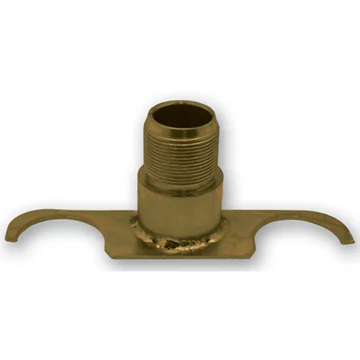
The Phoenix USA N6695 Right Hand Front Bracket (PN6695FRBK) is a crucial component designed specifically for the secure installation of wheel simulators on the front right-hand side of vehicles equipped with the Phoenix USA N6695 or N6695F simulator kits. This bracket is engineered to integrate seamlessly with the existing wheel structure, utilizing two conical lug nuts as its primary attachment points. Its robust construction ensures a stable and reliable mounting platform for your wheel simulator, contributing to both the aesthetic enhancement and the overall integrity of your vehicle’s appearance. Please note that the necessary jam nut for securing the bracket’s center stud is typically sold separately and must be acquired to complete the installation process effectively. This bracket is an essential part for achieving a professional and long-lasting fit for your Phoenix USA wheel simulators on the designated front right wheel.
KEY FEATURES AND BENEFITS:
- Dedicated Right-Hand Front Application: Specifically designed for the front right side of vehicles using Phoenix USA N6695 series simulator kits, ensuring correct fitment and orientation.
- Lug Nut Attachment: Utilizes two existing conical lug nuts for a straightforward and secure mounting process, eliminating the need for drilling or additional modifications to the wheel.
- Stable Mounting Platform: Provides a firm and reliable base for the wheel simulator, minimizing vibration and ensuring the simulator remains securely in place during vehicle operation.
- Compatibility with N6695 Series: Engineered to work seamlessly with Phoenix USA N6695 and N6695F wheel simulator kits, guaranteeing proper integration.
- Durable Construction: Likely manufactured from robust materials to withstand the rigors of road use and environmental factors, ensuring longevity and consistent performance.
SPECIFICATIONS:
- Part Number: PN6695FRBK
- Position: Front, Right Hand
- Thread Type: Right-hand thread (on the center stud)
- Mounting Type: Under 2 conical lug nuts
- Jam Nut: Typically Not Included (must be purchased separately)
- Compatibility: Phoenix USA N6695 Wheel Simulator Kit, Phoenix USA N6695F Wheel Simulator Kit
- Material: Likely Metal (for strength and durability)
HOW TO USE:
- Identify the Correct Wheel: Ensure you are working on the front right wheel of the vehicle.
- Loosen Lug Nuts: Using a lug wrench, slightly loosen two adjacent conical lug nuts on the wheel where the bracket will be installed. Do not remove them completely. Loosen them enough to allow the bracket to slip underneath.
- Position the Bracket: Carefully slide the Phoenix USA N6695FRBK bracket under the two loosened conical lug nuts. Ensure the bracket sits flush against the wheel surface. The center stud of the bracket should be pointing outwards.
- Tighten Lug Nuts: Once the bracket is correctly positioned, tighten the two lug nuts back down securely using the lug wrench. Ensure the bracket is held firmly in place by the tightened lug nuts.
- Attach Wheel Simulator: Align the wheel simulator with the mounted bracket. The center stud of the bracket will typically pass through a corresponding hole in the wheel simulator.
- Secure with Jam Nut (Sold Separately): Thread the separately purchased jam nut onto the center stud of the bracket from the outside of the wheel simulator. Tighten the jam nut securely to hold the wheel simulator firmly against the bracket.
- Final Check: Ensure the wheel simulator is properly aligned and securely attached. Double-check that all lug nuts and the jam nut are tightened appropriately.
BENEFITS OF USING THE PHOENIX USA N6695 RIGHT HAND FRONT BRACKET (PN6695FRBK):
- Ensures Proper Fitment: Designed specifically for the N6695 kit and the front right wheel, guaranteeing correct alignment and secure attachment of the simulator.
- Simplified Installation: The lug nut mounting system allows for a relatively easy installation process without requiring specialized tools or modifications to the vehicle’s wheels.
- Provides a Stable and Secure Hold: The bracket creates a robust connection point, preventing the wheel simulator from vibrating loose or detaching during vehicle operation.
- Maintains Wheel Integrity: By utilizing existing lug nuts, the bracket avoids the need for drilling or altering the original wheel structure.
- Facilitates Aesthetic Enhancement: Properly mounted wheel simulators, thanks to this bracket, contribute significantly to the overall appearance of the vehicle.
FEATURES:
- Engineered for Right-Hand Front Wheel Simulator Mounting: Specifically designed for the designated location, ensuring optimal functionality.
- Utilizes Existing Conical Lug Nut Interface: Integrates with the vehicle’s existing wheel hardware for a straightforward attachment.
- Features a Right-Hand Threaded Center Stud: Designed to accept a jam nut (not included) for securing the wheel simulator.
- Designed for Seamless Integration with N6695 Series Simulators: Ensures compatibility and proper alignment with the intended wheel simulator models.
- Robust Construction for Reliable Performance: Built to withstand the demands of regular use and maintain a secure hold over time.

Reviews
There are no reviews yet.